

Portkey enhances AWS’s Strands Agents with production features:
  • Complete observability of agent steps, tool use, and LLM interactions
  • Built-in reliability with fallbacks, retries, and load balancing
  • Access to 1600+ LLMs through the same OpenAI-compatible interface
  • Zero code changes to existing agent logic

Strands Agents Documentation

Learn more about Strands Agents

Quick Start

1

Install packages

pip install -U strands-agents strands-agents-tools openai portkey-ai
2

Add provider in Model Catalog

Go to Model Catalog → Add Provider. Select your provider (OpenAI, Anthropic, etc.), enter API keys, and name it (e.g., openai-prod).Your provider slug is @openai-prod.
3

Get Portkey API Key

Create an API key at app.portkey.ai/api-keys.Pro tip: Attach a default config for fallbacks and routing—applies automatically.
4

Configure Strands

from strands import Agent
from strands.models.openai import OpenAIModel
from strands_tools import calculator
from portkey_ai import PORTKEY_GATEWAY_URL, createHeaders

model = OpenAIModel(
    client_args={
        "api_key": "YOUR_PORTKEY_API_KEY",
        "base_url": PORTKEY_GATEWAY_URL,
        "default_headers": createHeaders(provider="@openai-prod")
    },
    model_id="gpt-4o",
    params={"temperature": 0.7}
)

agent = Agent(model=model, tools=[calculator])
response = agent("What is 2+2?")

How It Works

The integration uses Strands’ client_args parameter to route requests through Portkey:
# Strands passes client_args to OpenAI client
client_args = client_args or {}
self.client = openai.OpenAI(**client_args)  # Portkey config gets passed here
All Portkey features work without changes to agent logic, tool usage, or response handling.

Production Features

Observability

All agent interactions are automatically logged:
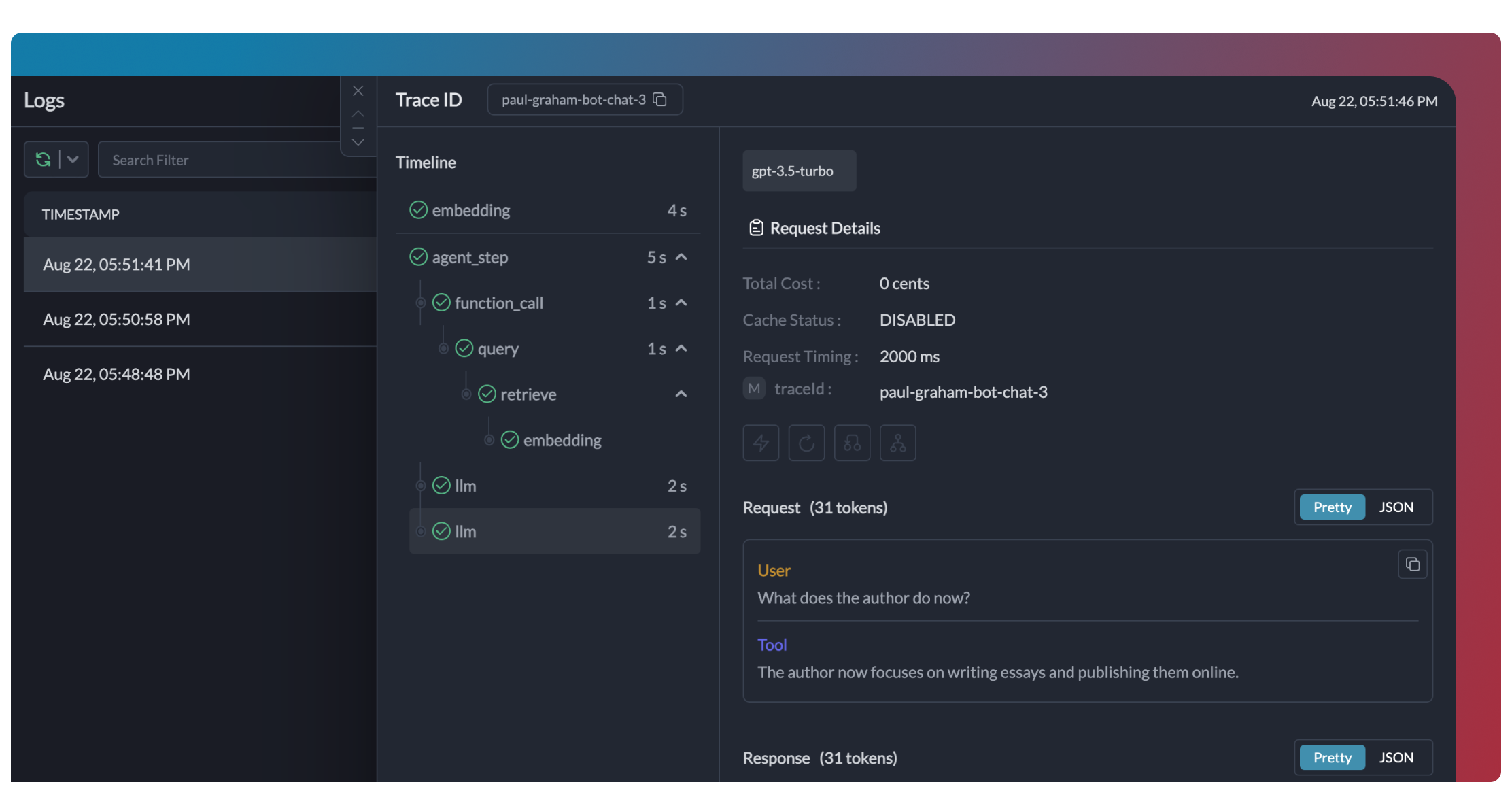
Add trace IDs to group related requests:
model = OpenAIModel(
    client_args={
        "api_key": "YOUR_PORTKEY_API_KEY",
        "base_url": PORTKEY_GATEWAY_URL,
        "default_headers": createHeaders(
            provider="@openai-prod",
            trace_id="agent-session-123"
        )
    },
    model_id="gpt-4o",
    params={"temperature": 0.7}
)
Add metadata for filtering and analytics:
"default_headers": createHeaders(
    provider="@openai-prod",
    trace_id="support-bot",
    metadata={
        "agent_type": "customer_support",
        "user_tier": "premium",
        "session_id": "sess_789"
    }
)

Reliability

Enable fallbacks, retries, and load balancing via Configs. Attach to your API key or pass inline:
model = OpenAIModel(
    client_args={
        "api_key": "YOUR_PORTKEY_API_KEY",
        "base_url": PORTKEY_GATEWAY_URL,
        "default_headers": createHeaders(
            config={
                "strategy": {
                    "mode": "fallback",
                    "on_status_codes": [429, 503, 502]
                },
                "targets": [
                    { "override_params": { "model": "@openai-prod/gpt-4o" } },
                    { "override_params": { "model": "@anthropic-prod/claude-sonnet-4" } }
                ]
            }
        )
    },
    model_id="gpt-4o",
    params={"temperature": 0.7}
)

Conditional Routing

Route based on metadata, input, or custom logic

Switching Providers

Change the provider to use different models:
model = OpenAIModel(
    client_args={
        "api_key": "YOUR_PORTKEY_API_KEY",
        "base_url": PORTKEY_GATEWAY_URL,
        "default_headers": createHeaders(provider="@anthropic-prod")
    },
    model_id="claude-3-7-sonnet-latest",
    params={"max_tokens": 1000}
)

Supported Providers

1600+ models from OpenAI, Anthropic, Google, Mistral, and more

Guardrails

Add input/output validation for safe agent behavior:
"default_headers": createHeaders(
    provider="@openai-prod",
    config={
        "input_guardrails": ["guardrail-id-xxx"],
        "output_guardrails": ["guardrail-id-yyy"]
    }
)

Guardrails Guide

PII detection, content filtering, and custom rules

Enterprise Governance

Set up centralized control for Strands Agents across your organization.
1

Add Provider with Budget

Go to Model Catalog → Add Provider. Set budget limits and rate limits.
2

Create Config

Go to Configs:
{
  "override_params": { "model": "@openai-prod/gpt-4o" }
}
3

Create Team API Keys

Go to API Keys. Create keys per team, attach configs.
4

Distribute to Teams

Teams use their Portkey API key—no raw provider keys needed:
model = OpenAIModel(
    client_args={
        "api_key": "TEAM_PORTKEY_API_KEY",  # Config attached to key
        "base_url": PORTKEY_GATEWAY_URL
    },
    model_id="gpt-4o",
    params={"temperature": 0.7}
)
Benefits:
  • Rotate provider keys without code changes
  • Per-team budgets and rate limits
  • Centralized usage analytics
  • Instant access revocation

Troubleshooting

Ensure all packages are installed:
pip install -U strands-agents strands-agents-tools openai portkey-ai
Test your Portkey API key:
from portkey_ai import Portkey

portkey = Portkey(api_key="YOUR_PORTKEY_API_KEY")
response = portkey.chat.completions.create(
    messages=[{"role": "user", "content": "test"}],
    model="gpt-4o"
)
Ensure fallbacks include rate limit codes:
"strategy": {
    "mode": "fallback",
    "on_status_codes": [429, 503, 502, 504]
}
Verify base_url is set:
print(model.client.base_url)  # Should be https://api.portkey.ai/v1

FAQ

Yes. Update your model initialization—agent code stays unchanged.
Yes. Tool use, multi-agent systems, and all features work.
Use a consistent trace_id across agents to see the full workflow in one trace.
Yes. Portkey stores your provider keys securely. Rotate keys without code changes.

Resources